
Debug APIs
Debugging, testing, and hot reload
Are you tired of restarting the game to test your mod?
Hot reload
Hot reload swaps in your rebuilt DLL while the game is running, so changing an item’s stats or a recipe doesn’t need a restart.
Add one call to your plugin’s Awake(). Everything before it runs once at startup; everything after it is replayed on every reload:
private void Awake()
{
    // Startup only, e.g. patches, commands, settings
    harmony.PatchAll();

    ContentReloadManager.EnableHotReload(ModGUID); // needs `using CUCoreLib.ContentReload;`

    // Reloadable elements! items, recipes, liquids, locale, etc...
    RegisterItems();
    RegisterRecipes();
}
Pass your plugin’s GUID constant, the same one used in [BepInPlugin]. CUCoreLib follows the methods you call after it to find your registrations.
Reloading
Rebuild your mod, then in the game console:
reloadcontent com.yourname.modnameOr let it reload by itself whenever the DLL changes:
autohotreload com.yourname.modname true
autohotreload com.yourname.modname false
If Windows won’t let your build overwrite the DLL while the game is running, point CUCoreLib at your build output instead. In BepInEx/config/CUCoreLib.cfg, under [Hot Reload], set com.yourname.modname.overridePath to e.g. your project’s bin\Debug\net48\MyMod.dll.
What can be reloaded
| Reloads | Doesn’t reload (restart the game) |
|---|---|
| Items, recipes, liquids | Harmony patches |
| Basic building entities | Console commands |
| Locale and loaded assets | Settings, save providers, multiplayer hooks |
| Tiles, liquid tiles, structures |
Hot reload is singleplayer only.
Loading straight into a world
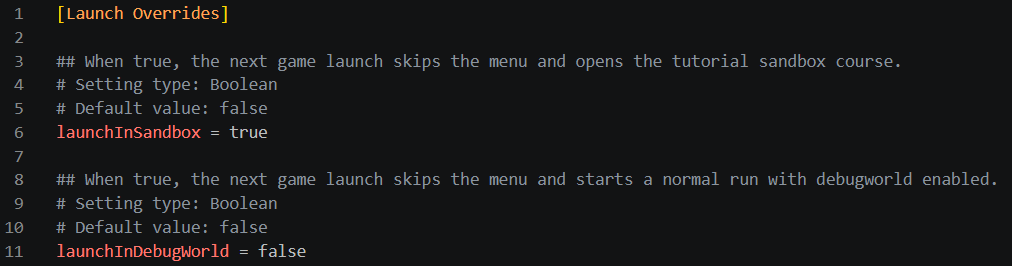
BepInEx/config/CUCoreLib.cfg has options to skip the menu and load straight into the debug world or the tutorial on launch.
Testing multiplayer on one PC
The game only allows one copy of itself to run. To run two:
- In
Casualties Unknown\CasualtiesUnknown_Data\boot.config, delete theforceSingleInstance: 1line. - Launch
CasualtiesUnknown.exetwice, directly (not through Steam). - In the multiplayer mod, switch both from Steam to IP hosting, and give each a different player name.
- Host on one, connect with the other.